Integration of Backup Events into Datto
Here is how to retrieve backup events in the Windows Event Log and integrate them into Datto.
-
Access the Datto interface:
- Log in to your Datto RMM account.
-
Configure a new event monitor:
- Go to the Alerts section.
- Add a new monitor and select the "Windows Event Log" type.
-
Specify monitoring criteria:
- Set the log type:
Application. - Set the source:
ArxOne. - Finally, define the event type, severity, and frequency.
- Set the log type:
Example for backup failures:
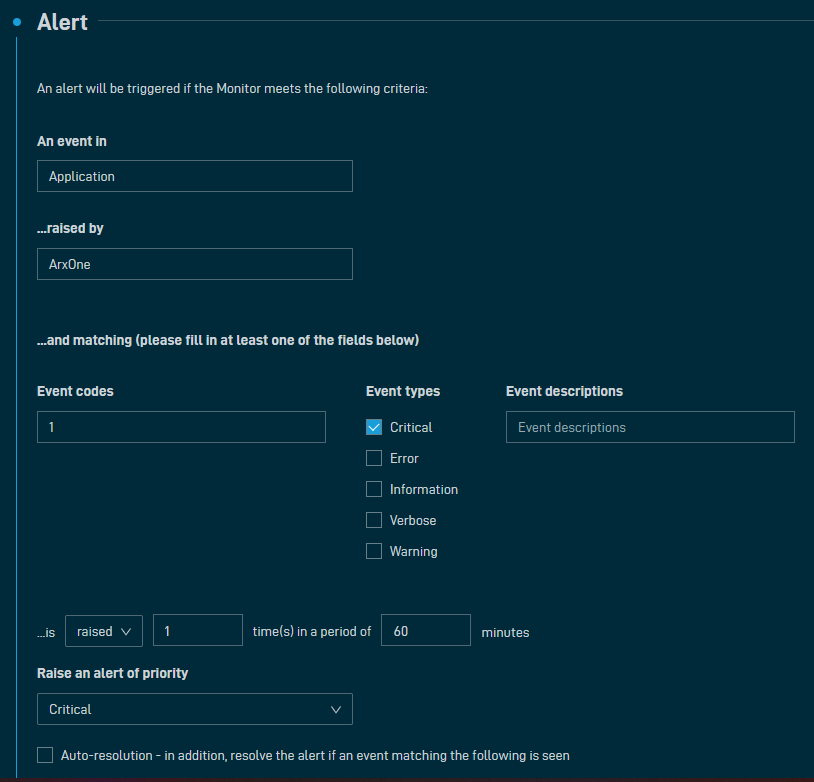
You can directly import the four alert types using the following CSV file:
   Alert,Type,Description,Latest value,Policy,Latest 10 days of alerts,Enabled
"736b4c81-e9b6-44ab-b2bd-a946b8e6fc46,Event Log,Application Source: ArxOne | Event: 1 | Type: Information | Description:  | Occurs 1 time(s) in 1 hour,, ,""Alert UID: 736b4c81-e9b6-44ab-b2bd-a946b8e6fc46, No alert, No alert, No alert, No alert, No alert, No alert, No alert, No alert, No alert"",Yes"
",Event Log,Application Source: ArxOne | Event: 1 | Type: Critical | Description:  | Occurs 1 time(s) in 1 hour,, ,""Alert UID: 471669dc-3085-4438-8a11-14be966f02f7, Alert UID: 662190d3-94c0-4dcb-8239-004a1ce5624e, No alert, No alert, Alert UID: 19b2d4fe-bf3f-4430-a5cb-0d434d153398, Alert UID: bbc8cb21-65b4-4c3e-9ad4-afe2b4877b70, No alert, No alert, No alert, No alert"",Yes"
,Event Log,Application Source: ArxOne | Event: 1 | Type: Error | Description:  | Occurs 1 time(s) in 1 hour,, ,There were no alerts in the last 10 days,Yes
,Event Log,Application Source: ArxOne | Event: 1 | Type: Warning | Description:  | Occurs 1 time(s) in 1 hour,, ,There were no alerts in the last 10 days,Yes