Quick Start Guide
1. Credentials
You have received credentials that you must keep carefully.
⚠️ We strongly recommend that you store your password in a secure location.
For security reasons, a lost password cannot be reset.
It is therefore very important not to lose it.
2. Connection
Daily use of our backup service is carried out exclusively through the management console.
To get started, connect to https://app.arx.one/ using the credentials provided to you.
3. Creating Backup Accounts
From the management console, go to the Accounts activity in the Administration section.
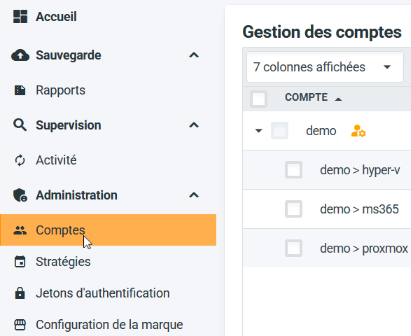
To create a new account, click the "Create a backup account..." button at the bottom of the interface.

The > symbol represents account hierarchy, for example:
demo>hypervisor, where thehypervisoraccount is a child of thedemoaccount.demo>client>machine, wheremachineis a child ofclient, which is itself a child ofdemo.
We recommend that integrators create accounts using the format integrator>client>machine.
If the client has only one machine, you do not need to create the integrator>client account. The integrator>client>machine account will remain independent.
However, if the client wants to add more machines, you can create the integrator>client account and then new child accounts such as integrator>client>nas, integrator>client>server, etc.
This allows you to:
- Keep "flat" accounts for single-machine clients
- Have a tree view for larger environments
- Allocate a global quota to the client (not per machine) while maintaining clear naming
⚠️ Even if a machine changes over time, an account must only be used on one machine at a time.
The rule is: one account = one agent = one machine!
4. Agent Deployment
Backup agents are available from our download page.
They must be linked to the previously created accounts during installation.
More information by platform:
➡️ Windows
➡️ mac OS
➡️ Linux
➡️ Synology DSM
➡️ QNAP QTS
5. Configuring a Backup Agent
To select the data to back up, go to the Selection activity in the Backup section.
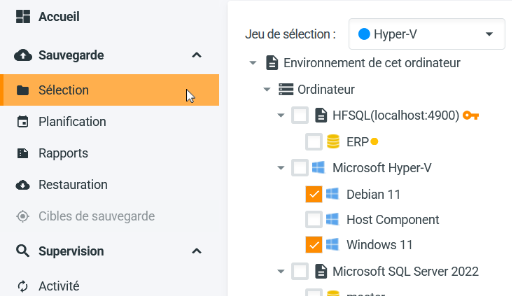
The selection view shows the available items:
- Software components, such as hypervisors, database managers, or shared folders (for NAS)
- The file system with its disk, folder, and file hierarchy
- Microsoft 365 services
- Network shares
Select the items to back up and save your selection.

ℹ️ In most cases, you only need to define the data to back up, which we call the selection.
Each backup agent uses default retention and scheduling settings (one year of retention and execution at 8 p.m. from Monday to Friday).
These values are easy to change, but this default configuration fits most use cases.
6. Activity Monitoring
The console home screen allows you to monitor the activity of the connected account and all its child accounts.
Alerts and errors may appear for each active account, and you are free to adjust their severity or ignore them.
There are four severity levels:
- 🟢 None: everything is fine, everything is under control!
- 🟠 Warning: non-blocking event to consider, may indicate potential risk
- 🔴 Error: error affecting one or more backup elements without stopping the process
- 🔴 Blocking error: error causing backup failure
ℹ️ A summary of your account status can also be sent to you via the supervision report.
This allows you to easily monitor your backup activity without logging into the console.
The supervision report reflects the severity levels you defined or modified on the home screen.
Do not change severity levels lightly, as you may miss important information!
7. Advanced Features
Arx One Backup allows you to go very far in defining backup policies, enabling you to closely match your users’ data restoration expectations.
Here are some examples of available features:
- Backup Retention
- Selection sets
- Data filtering
- Advanced scheduling (scheduled backups, continuous backup, and selection sets)
- Managed agent deployment
- Strategies for managing large environments
- And more...
Technical Support
If you have any questions or feedback, feel free to contact our technical support.