Scheduling
Scheduling Interface
This section graphically represents the time slots allocated to data backup.
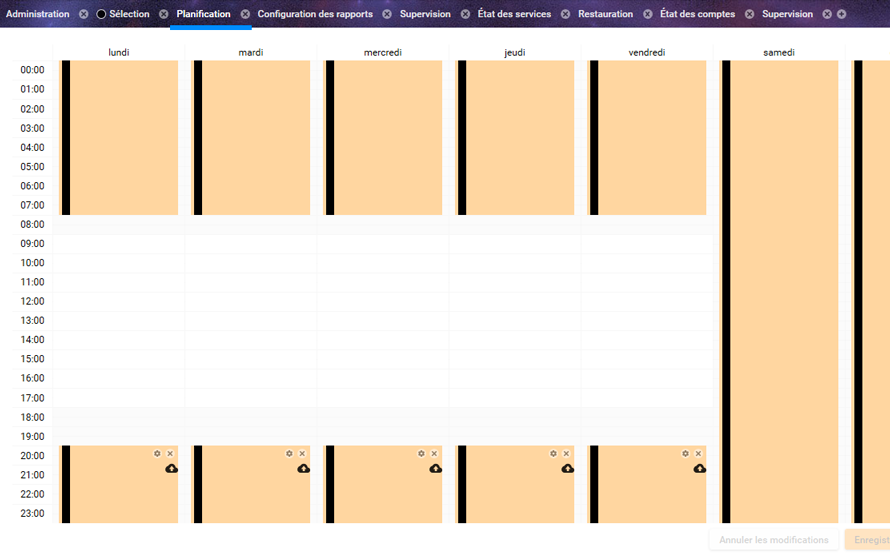
Each column represents a day of the week, with midnight at the top and 11:00 PM at the bottom.
Editing a Schedule
To delete a backup time slot, click the cross located at the top right of the schedule.
To create one, click the + button at the top right of the planner. You can also double-click anywhere on the schedule to add a slot.
To modify its duration, click the top or bottom of the backup slot and drag while holding the mouse button. You can move the mouse vertically to change the start or end time on the same day, or horizontally to change the day.
Schedule Settings
When inspecting a schedule, you can access its properties.
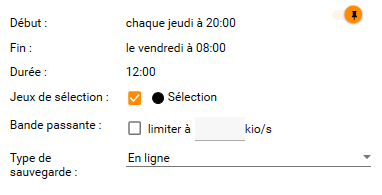
The inspector allows you to define:
- The selection sets to be processed during the schedule
- The processing order of selection sets (by drag and drop in the list, the top one will be processed first)
- Bandwidth limitation
- The type of operation to perform
Bandwidth Limitation
To limit bandwidth, check the "Limit bandwidth" box, then enter the allocated throughput in kilobytes per second in the available field.
Operation Types
Two types of operations are available:
Online Backup
Backup to a group of Arx One servers. These servers can be on-site (backup appliance) or hosted externally.
Online backup keeps a history of data throughout the entire retention period. Storage servers are independent from client operations and do not provide any network sharing protocol. This ensures an optimal level of security.
Online backup is represented in the schedule by a cloud icon.
Local Replication
This is a "mirror" copy of your data on local storage. This physical local storage can be a local disk, an external disk, or a NAS.
Data replication does not manage version history and uses standard data access protocols (direct access and SMB). Its security level is lower than online backup, but it allows very fast disaster recovery in case of hardware failure, thanks to immediate data availability.
This operation is represented in the schedule by a folder icon.
Choosing Operation Types
In schedule settings, you can perform different types of backups:
- Online: a single backup performed on the primary server (appliance or hosted) and then synchronized to others
- Local replication, then online: local replication is performed first, followed by online backup (two separate operations)
- Online, then local replication: online backup is performed first, then local replication (two separate operations)
- Local replication only: replication only to the selected local storage
The default operation type is "Online".