Rapports par e-mail
Cette page présente les rapports disponibles pouvant être envoyés par e-mail.
Paramétrage
Il est nécessaire de se connecter à la console pour paramétrer l'envoi des rapports.
➡️ Accéder à la console Arx One
Une fois connecté, sélectionnez l'activité Rapports dans la section Sauvegarde.
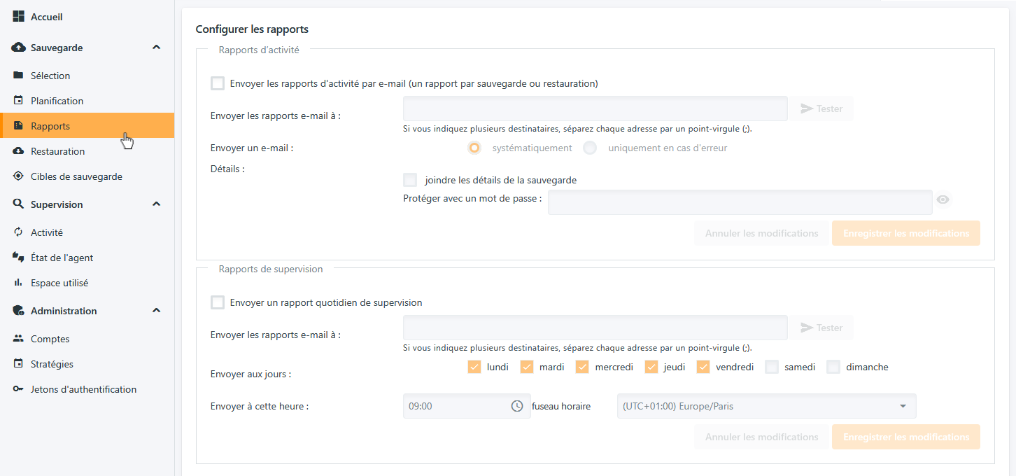
Il existe deux types de rapports différents :
- Le rapport d'activité
- Le rapport de supervision
Rapport d'activité
Le rapport d'activité est envoyé par l'agent de sauvegarde à la fin de chaque activité (sauvegarde ou restauration).
Pour l'activer, il suffit de cocher la case "Envoyer les rapports d'activités par e-mail" et de saisir les adresses de destination dans le champ en dessous.
💡 Si vous souhaitez avoir plusieurs destinataires, il faut séparer les adresses par le caractère
;.
Il est possible de recevoir ces rapports :
- Systématiquement, à la fin de chaque sauvegarde ou restauration
- Uniquement lorsqu'une erreur est rencontrée pendant l'activité
En cas d'erreur, la priorité du message est automatiquement réglée à haute.
Un fichier Excel peut être joint au rapport. Ce fichier contient le détail de l'activité et peut-être activé en cochant la case "Joindre le détail de la sauvegarde".
⚠️ Attention, le fichier Excel est limité en taille pour des questions de transfert par mail. Au-delà de 500 000 éléments, il est conseillé de consulter les rapports directement dans la console.
Rapports de supervision
Le rapport de supervision est envoyé par des serveurs hébergés les jours et à l'heure que vous souhaitez.
Ce rapport envoie une synthèse de l'activité du compte émetteur ainsi que de tous ses comptes descendants.
Pour l'activer, il suffit de cocher la case "Envoyer un rapport quotidien de supervision" et de saisir les adresses de destination dans le champ en dessous.
💡 Si vous souhaitez avoir plusieurs destinataires, il faut séparer les adresses par le caractère
;.
Cocher ensuite les jours auxquels recevoir le rapport, puis sélectionner l'heure d'envoi ainsi que le fuseau horaire associé.
Comparatif des rapports
| Rapport d'activité | Rapport de supervision | Remarques | |
|---|---|---|---|
| Envoyé par | Agent de sauvegarde | Serveurs | Le rapport de supervision est envoyé même lorsque les agents sont éteints |
| Portée | Compte émetteur | Compte émetteur et comptes descendants | |
| Contenu | Résultat de l'activité et détail au format Excel | Synthèse de l'activité et du quota | Rapports Excel limités à 500 000 lignes |