Selection Sets
About
A selection set is a collection of data selected for a backup task.
Using different selection sets allows you to back up data at different frequencies or with different options.
Usage
The upper part of the backup tab allows you to:
- choose the selection set to work on using the drop-down list
- edit the properties of the current selection set using the gear icon
- delete the current selection set using the cross icon

Properties
To access the properties of the current selection set, click the gear icon to open the inspector.
The inspector allows you to work on four options:
- General
- Continuous Data Protection (CDP)
- Scripts
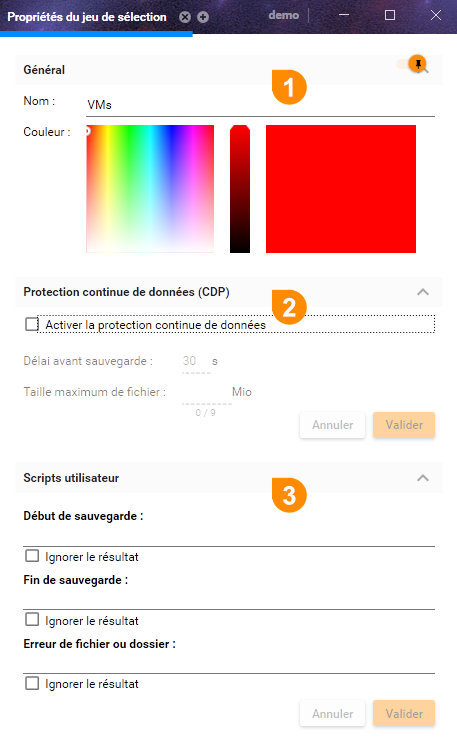
General
This section allows you to change the name of the selection set and its representative color.
This information is used in:
- The selection set selection menu
- Backup Data Selection
- Backup Scheduling
Continuous Data Protection (CDP)
To enable continuous backup, simply check the corresponding activation box.
You can also customize the delay after which modified data is backed up. The default value is 60 seconds.
To keep continuous backup as transparent as possible, large files can be excluded. Check the corresponding box and specify the maximum allowed file size (expressed in megabytes).
Warning! Continuous backup does not back up open files. When using continuous backup, it is essential to keep backup schedules for the selection set so that open files are also backed up.
Scripts
Arx One Backup allows you to trigger script execution based on three events:
- Before the backup starts
- After the backup ends
- In case of error during a backup
You can specify a different script for each event. To do so, enter its full path in the dedicated field.
When you run a script, the backup software waits for its execution to finish before starting its work.
If your script returns an error code (return value different from 0), the backup software will report an error in the backup reports. If you are not familiar with script return values, you can check the box that allows you to ignore them.
Warning! Scripts, like the backup service, are executed by the system account. If they require access to resources not available to the system (screen, network shares, etc.), this may block script execution and delay backup startup.